2026-05-27
How to Make Amazon Links Actually Work Worldwide (No More Wrong Store Frustration)
One Amazon link usually means lost sales outside the US. This guide shows how Untrap routes global traffic to the right regional destination from a single short link. Covers custom regional links (different ASINs or non-Amazon destinations), affiliate tag preservation, and deep-linking to the native Amazon app.
The Problem
If you share an amazon.com link with a global audience, users in the UK, Canada, or Japan land on the US marketplace.
They see international shipping fees, import duties, or "This item does not ship to your country." Most won't search for the product on their local store - they close the tab.
To capture international traffic, you need routing that detects a user's location and sends them to the correct local store from one link.
How Untrap Handles Amazon Links
Other link tools try to guess your product mappings and often break. Untrap lets you control exactly where each country goes.
1. Any Amazon Link Format Works
Untrap accepts raw URLs, shortened links (amzn.to), or links with tracking parameters.
2. Affiliate Tags Stay Intact
If you're an Amazon Associate, your tracking tags are preserved. Untrap routes the link as-is.
3. Deep-Linking to the Native App
The quickest way to lose a sale on mobile is making users log in again in a browser. Untrap uses device detection:
- Amazon App Installed: Opens the link directly in the Amazon app for 1-Click checkout.
- No Amazon App: Opens in the device's default browser (Safari or Chrome), where they're likely already logged in.
Configuration
Untrap doesn't guess domains. You provide exact destinations per country.
Step 1: Provide Your Base Link
Paste your primary destination URL. Untrap stores it exactly as provided.
Step 2: Add Regional Overrides
Product catalogs vary by country, so you define which link goes where:
US Base Link: amazon.com/dp/B0CCXYZ123?tag=yourtagus-20 (Your Main ASIN + US Tag)
🇨🇦 Canada Override: amazon.ca/dp/B0CCXYZ123?tag=tagca-20 (Same ASIN + CA Tag)
🇬🇧 UK Override: amazon.co.uk/dp/B0DDABC456?tag=taguk-21 (Different ASIN + UK Tag)
🇩🇪 Germany Override: local-german-retailer.de/product (Non-Amazon alternative)
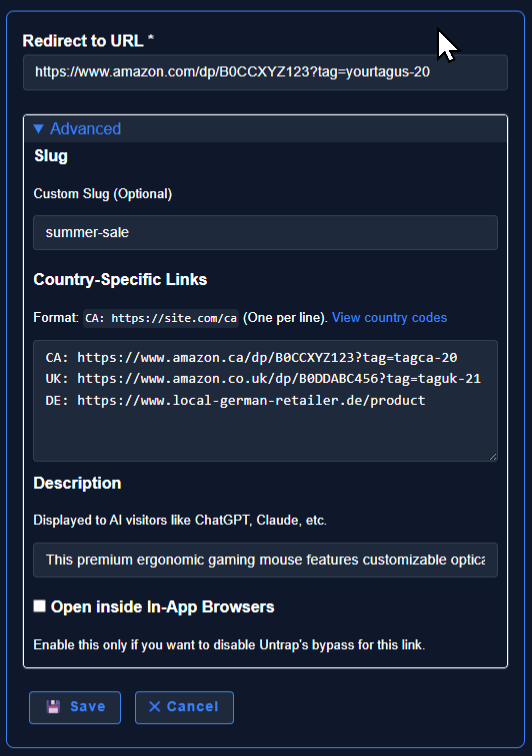
Tip: If a product uses a different ASIN in the UK, or is out of stock on Amazon Germany, you route those countries to different ASINs - or to non-Amazon stores.
Step 3: Custom Domain (Optional)
Using your own domain (e.g., shop.yourbrand.com/product) increases link trust and avoids social media algorithm flagging.
Step 4: Publish One Link Everywhere
Now you have a single Untrap link that routes each country to the right store. Drop it everywhere - Instagram bio, TikTok link, Facebook posts, Twitter/X, YouTube descriptions, email newsletters, DMs.
Example: https://untrap.link/summer-sale
Here's what happens when people click it:
- On Instagram, Facebook, or TikTok: The link escapes the in-app browser and opens the Amazon app directly (or their system browser if Amazon isn't installed). No login prompt, no stuck web view.
- On desktop: Standard redirect to their regional store based on location.
- From AI agents or search crawlers: Untrap returns structured metadata instead of a redirect, preserving your SEO and making the link readable by AI shopping assistants.
All clicks from every platform are tracked in one dashboard. UTM parameters pass through automatically, so you can see exactly which post or ad drove the sale.
See It in Action
Performance: Legacy vs. Untrap
| Feature | Legacy Redirection | Untrap Global Links |
|---|---|---|
| Link Input Types | Rigid URL structures only | Accepts raw, amzn.to, and tagged links |
| Domain Flipping | Algorithmic guessing (Often breaks) | Complete user control per region |
| Mobile Destination | Trapped in-app web views | Opens native Amazon App (Deep-linking) |
| Affiliate Tag Safety | Risk of tags being stripped or overwritten | Tags remain completely untouched |
| Non-Amazon Fallbacks | Forbidden / Unsupported | Fully supported for any regional destination |
Stop losing international sales to wrong-store redirects. Route traffic precisely and let your audience buy from their local store in one click.
All Posts
- 2026-05-27: How To Make Amazon Links Actually Work Worldwide
- 2026-04-30: Untrap Vs Standard Link Shorteners
- 2026-04-12: Why 70 Percent Social Media Links Killing Sales